


Lumary
4.6386.00 Reviews
App Specs
- Version
- 1.8.8
- Updated On
- License
- Free
- Downloads
- 100,000+
- Developer
- Shenzhen Lingke Technology Co., Ltd.
- Categories
- House & Home
- Platform
- Android
Screenshots



 Analysis by AppCompare
I approached Lumary as a practical house-and-home app rather than something to open once and forget. Its promise is simple: bring compatible smart-home control into one place. That sounds straightforward, but the real question is whether it makes daily routines easier than using separate device apps, physical switches, or a more established smart-home platform.
My overall impression is positive, with an important condition: Lumary makes the most sense when your home already includes devices that belong in its ecosystem. If you are trying to manage compatible lighting or other connected home products from one phone, it can reduce the small annoyances of jumping between apps. If your devices come from unrelated brands, the experience may be less useful than a platform chosen specifically for broad compatibility.
The app is free, aimed at Everyone, and comes from Shenzhen Lingke Technology Co., Ltd. It sits in the House & Home category, where convenience matters more than entertainment or visual polish. Its store summary, “Let there be smart,” captures the general idea, but it does not explain the decisions that matter in everyday use: how much setup effort you are willing to accept, how often you need the app, and whether you want a focused controller or a wider smart-home hub.
How I would decide whether Lumary fits my home
I’d use this section to check whether Lumary matches the devices I already own and the way my household prefers to control them, rather than treating an app install as a commitment to a whole system. I’d also consider who will need to use it and whether the main benefit solves a recurring inconvenience. With that fit in mind, the next section looks at the situations where it earns its place most clearly.
Start with the devices, not the app
The first decision is compatibility. I would not install Lumary simply because I want a smart-home app; I would begin by checking whether the connected products I own or plan to buy are designed to work with it. That is especially important for lighting, because a controller can feel excellent when it recognizes every relevant product and frustrating when it leaves one important device outside the system.
This is also why I would avoid judging the app only by its appearance. A clean interface is helpful, but it cannot compensate for an incompatible bulb, switch, strip, or accessory. Before moving a whole room into Lumary, I would test the device that matters most. A single trial setup can reveal whether pairing, naming, control, and everyday access feel manageable in my particular home.
Think about the people who will use it
A smart-home app is not only for the person who installs it. I would consider whether another family member needs to control the same devices, whether guests might encounter unfamiliar switches, and whether the home still needs to work normally when nobody wants to reach for a phone. Lumary is most convincing when it adds convenience without making ordinary control feel dependent on a complicated routine.
Worth Reading Before You Choose

EA SPORTS FC Mobile 26 Is a Bigger Football Game, but It Takes Time

Flipboard Shows What News Apps Must Do Beyond the Feed

Switching to Android Auto Means Rethinking Your Driving Routine

Google Calendar Makes a Crowded Week Easier to Manage

Ludo King Makes the Most of the Minutes Between Plans

Baby Panda World Brings Quick Play to Modern Phones, but Its Game Library Feels Busy
For a single user who enjoys adjusting connected lighting from a phone, a focused app can be perfectly adequate. For a household with many brands, several rooms, and different preferences about voice assistants or automation, I would compare it with a broader platform before committing. The wider option may require more planning, but it can be a better long-term home for a mixed collection of devices.
Separate occasional control from daily routines
I see two very different use cases. The first is occasional control: opening the app to change a light, check a room, or adjust a connected product. The second is routine management, where the app becomes part of morning, evening, arrival, or bedtime habits. Lumary can be worthwhile in the first situation if it gives direct access to compatible devices. In the second, small friction becomes much more noticeable.
My advice is to test the action you expect to repeat most often. If you want to change bedroom lighting before sleep, try doing that when the phone is already in your hand and when you are in a hurry. If you want to control a living-room device while carrying groceries, consider whether opening the app feels easier than using a wall control. This kind of test tells you more than a short store description.
What the current release tells me
Lumary is currently at version 1.8.8 and supports devices running Android 6.0 or later. That gives it a broad enough operating-system starting point for many older Android phones, although compatibility with the phone does not automatically guarantee compatibility with every connected product. I would still check the device requirements before planning a large installation.
The app has an average rating of 4.6 from around 2.4 thousand ratings, with 385 written reviews and over 100 thousand installs. Those figures suggest that it has found a real audience, but I would treat them as a starting signal rather than a promise that every setup will be effortless. Smart-home experiences vary heavily with the device, network, room layout, and expectations of the person installing them.
A realistic evening scenario
Imagine that I have connected lighting in the living room and bedroom. In the evening, I want to dim the living room while preparing dinner, then switch attention to the bedroom without searching through several manufacturer apps. The value of Lumary in that moment is not a dramatic feature; it is the reduction of tiny interruptions. One place to look, familiar device names, and fewer repeated setup decisions can make the home feel calmer.
The trade-off appears when something changes. If the phone is replaced, the home network is reorganized, or a device is reset, I may need to spend time restoring the arrangement. That is why I would keep device names clear and avoid creating a structure that only I understand. “Bedroom ceiling” is more useful than a vague factory name, especially when another person needs to take over.
Where Lumary is strongest in everyday use
For me, Lumary is strongest when it brings compatible devices into a simpler routine instead of becoming another screen I have to remember to open. Clear room-based names and a small, practical setup can make a noticeable difference when I’m controlling more than one device or sharing access at home. The following section considers how that everyday usefulness holds up over time.
A focused path into connected lighting
Lumary’s strongest position is as a focused control point for compatible smart-home products, particularly when I want a direct relationship between the app and the devices I actually use. A dedicated ecosystem can be easier to understand than a general platform filled with options I never touch. If my home is built around products intended for Lumary, the narrower scope may feel like an advantage rather than a limitation.
I also appreciate the possibility of keeping related devices together conceptually. Instead of remembering which manufacturer app belongs to which room, I can think in terms of the home itself. That shift matters when the goal is not experimenting with technology but making a routine more convenient. The app becomes useful when it disappears into the background of normal life.
The naming habit that prevents future confusion
One practical improvement I would make immediately is to name devices by room and purpose. This is more important than it sounds. A home can start with one connected light and grow gradually, and factory names that seemed harmless at the beginning become confusing later. Clear labels make manual control faster and reduce the chance of changing the wrong room.
I would also keep names short enough to recognize at a glance. If the household uses several similar lights, adding a location and function is more useful than adding decorative wording. This is a simple workflow rather than a flashy feature, but it is one of the easiest ways to make a smart-home app feel dependable.
Why free matters here
Lumary is free, which lowers the cost of trying it with a compatible product. That matters because smart-home decisions are often uncertain until the first real week of use. I can test whether the app fits my habits without adding an app fee to the purchase decision.
Free does not mean costless in the broader sense. The hardware still represents the main investment, and my time has value too. If setup takes repeated attempts or if the app does not suit the rest of my home, the switching effort can outweigh the appeal of avoiding a subscription. I would therefore treat the free price as an invitation to test, not as a reason to move every device immediately.
A useful test before expanding
I would begin with one room and one important routine. For example, I might connect the main bedroom light and use Lumary for several evenings. During that test, I would pay attention to four things: whether the device remains easy to find, whether the control feels predictable, whether other household members understand it, and whether I still prefer the physical control for quick actions.
- Choose a device that you use every day rather than an occasional decorative product.
- Give it a clear room-based name as soon as it is added.
- Ask another person to find and control it without coaching.
- Keep the original control method available while you decide.
This approach exposes the real strengths and weaknesses without turning the entire home into a trial project. It also answers a question many people overlook: whether the app is convenient for everyone, not just for the person who enjoys setup.
Where I noticed the friction
The main friction is ecosystem dependence. A focused app can be smooth inside its intended family of products and less satisfying outside it. If I own a mixture of devices from several manufacturers, I may end up with Lumary alongside other apps rather than replacing them. That can recreate the clutter I was trying to remove.
There is also a learning curve whenever connected devices are introduced. Even a straightforward controller asks me to understand device naming, room organization, network behavior, and what happens after a reset. Lumary may simplify control after setup, but it cannot remove every practical responsibility that comes with a connected home.
Another limitation is psychological rather than technical: phone control is not always the fastest control. When I am beside a wall switch, reaching for the switch can be more natural. I would use Lumary for situations where remote or centralized control genuinely helps, not force it into every interaction just because the device is smart.
When another category is a better fit
If I am building a home around many unrelated brands, I would look first at a broader smart-home platform. Its advantage is not necessarily a better experience for one Lumary-compatible product; it is the possibility of organizing a mixed collection under one wider system. The compromise may be more configuration and a less focused interface.
If I only need one connected light and rarely change it, a physical control or the manufacturer’s simplest available method may be enough. In that case, installing another app can add more complexity than value. Lumary becomes easier to justify as the number of compatible devices or repeated routines grows.
For someone who prioritizes advanced automation above all else, I would compare the app’s practical workflow with a platform built around complex scenes and cross-brand rules. I would not choose a broad system merely because it has more menus, though. More control is useful only when I am prepared to maintain it.
The cost of changing direction later
Switching ecosystems is not just a matter of deleting one app and installing another. I may need to rename devices, rebuild room organization, teach household members a new control method, and repeat setup for products that do not transfer cleanly. This is why I would avoid buying hardware solely because the first app looks appealing.
My safer approach would be to choose the ecosystem around the devices I expect to keep longest. If Lumary-compatible products already suit the rooms I am improving, using Lumary can be a sensible low-cost experiment. If I am starting from nothing and expect a varied home, I would compare the long-term structure before buying several products tied to one controller.
I would also document the arrangement in a simple personal note: room names, device purpose, and the routine each one supports. That small record makes troubleshooting and handover easier. It is especially useful when a device is reset or another person needs to understand the home without repeating the original setup process.
Questions I would answer before installation
Would I recommend Lumary to someone with an older Android phone? Yes, provided the phone meets the Android 6.0 minimum and the connected product is compatible. The operating-system requirement is not unusually demanding, but the device itself remains the more important check.
Is it suitable for a family? It can be, especially if the household agrees on clear names and keeps ordinary controls available. I would not assume that every family member will enjoy app-based control, so I would test the experience with the least technical person in the home.
Can it replace every smart-home app? I would not promise that. Its usefulness depends on the devices it supports, and a mixed-brand home may still need another platform or several separate controllers. That is not a flaw unique to Lumary; it is the practical boundary between a focused ecosystem app and a universal-style hub.
Is the free price enough reason to choose it? No. It removes one barrier, but the better reason is a good match between the app and the hardware already in the home. A free app that creates repeated confusion is more expensive in time than a paid or broader alternative that fits the household better.
Should I move all rooms at once? I would not. One-room testing is safer, easier to reverse, and more revealing. If the first room works well for a real routine, expanding gradually lets me keep the system understandable.
My recommendation for different kinds of users
I would recommend Lumary to someone who owns compatible smart-home products, wants a straightforward mobile control point, and prefers to start without an app charge. It is also a good candidate for a small installation where the main goal is to make connected lighting or similar home devices easier to manage from one place.
I would be more cautious for a person who has already invested in a different smart-home ecosystem, owns products from many unrelated brands, or dislikes troubleshooting connected hardware. In those situations, the best alternative may be the platform that already organizes most of the home, even if Lumary itself is pleasant to use.
My final advice is to treat Lumary as a compatibility-led decision, not a universal answer. Try one important device, use it during a normal week, and involve another household member before expanding. The app’s free availability, Everyone age rating, established audience, and current version make it easy to test, while its ecosystem focus means the final verdict depends on the hardware around it. For the right home, Lumary is a practical way to make smart control feel less scattered; for a mixed or very automation-heavy home, a broader alternative may be the wiser foundation.
Pros
- Simple controls make smart lighting easy to manage.
- Supports customized lighting scenes for different moods.
- Remote access lets you adjust lights when away from home.
- Scheduling features can automate daily lighting routines.
- Useful device grouping for controlling several lights together.
Cons
- Requires compatible Lumary hardware to provide full functionality.
- Some features may depend on a stable Wi-Fi connection.
- Initial device pairing can be confusing for new users.
- Advanced automation options may feel limited for power users.
- Performance can vary depending on the connected lighting setup.
FAQs for Lumary
What is Lumary and what can I use it for?
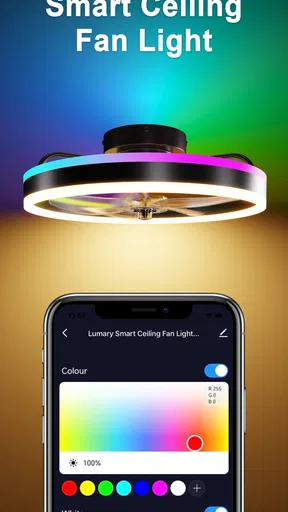
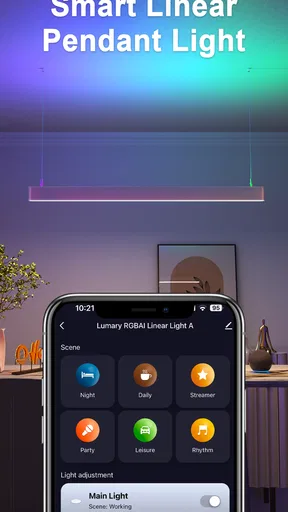
Lumary is a smart-lighting control app designed to manage compatible Lumary LED bulbs, strips, fixtures, and other connected devices from a mobile phone. After pairing your lights, you can usually switch them on or off, adjust brightness and color, select preset scenes, and organize devices by room. The exact functions available depend on the Lumary products connected to your account and their compatibility with the app.
How do I connect Lumary lights to the app?
To connect a Lumary device, install the app, create or sign in to an account, and place the light into pairing mode. The app normally guides you through selecting the device type and connecting it to a supported Wi-Fi network. Many smart lights require a 2.4 GHz network during setup, so pairing may fail if your phone is connected only to 5 GHz Wi-Fi. Keeping the light close to the router can also improve the initial connection.
Can Lumary lights be controlled remotely or with voice assistants?
Yes, compatible Lumary products can generally be controlled remotely when they are connected to the internet and properly linked to your account. The app may also support integration with voice platforms such as Amazon Alexa or Google Assistant, allowing you to use voice commands for basic controls. Availability can vary by device, region, firmware, and supported service, so check the product description before purchasing.
Does Lumary require a subscription or work without an internet connection?
The Lumary app is generally available without a mandatory subscription for standard functions such as turning lights on and off, changing colors, adjusting brightness, and creating schedules. However, internet access is usually needed for account features, remote control, cloud synchronization, firmware updates, and voice-assistant integrations. Some local controls may continue to work on the same network, but functionality can be limited if the internet or Wi-Fi connection is unavailable.
Is Lumary easy to use, and what should I know before downloading it?
Lumary is relatively straightforward once the compatible light has been installed and placed in pairing mode, although first-time setup can require patience if the device does not immediately appear. Users should check their phone’s permissions, Wi-Fi frequency, and product compatibility before downloading. The app is most useful for people who want schedules, scenes, color customization, and centralized control rather than only a basic physical switch.


